Know what you really earn, owe and can spend.
One spreadsheet for your invoices, income in USD, EUR, GBP or any other currency, expenses and tax savings. Exchange rates update themselves in Google Sheets.
Get it for $19 (launch price)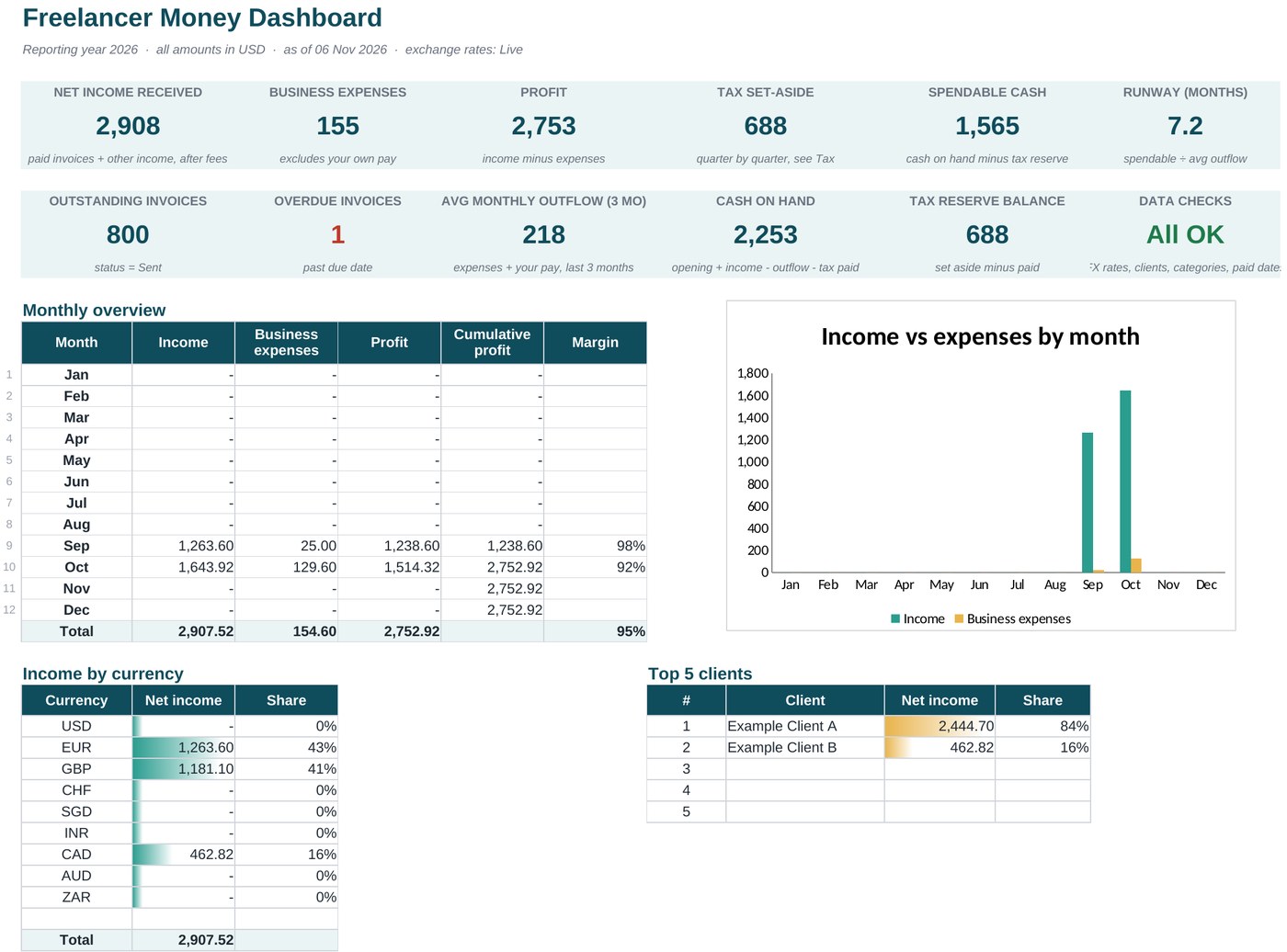
If you get paid in different currencies, this is for you
Most budget templates assume one currency and one paycheck. Freelance money does not work like that: one client pays in euros, another in dollars, a third by direct transfer, and the exchange rate changes every day.
"Did I actually make money this month?"
See income, expenses and profit by month, all converted to your own currency at the rate on the day you were paid.
"Who still owes me?"
Track sent invoices, see what is outstanding and which ones are overdue, at a glance.
"How much is safe to spend?"
Set aside tax each quarter and see your spendable cash and how many months of runway you have.
What's inside
Nine tabs that work together. You type in the yellow and blue cells; everything else calculates for you.
- Dashboard: net income, expenses, profit, tax set-aside, spendable cash, runway, income by currency, top clients, expenses by category and automatic data checks.
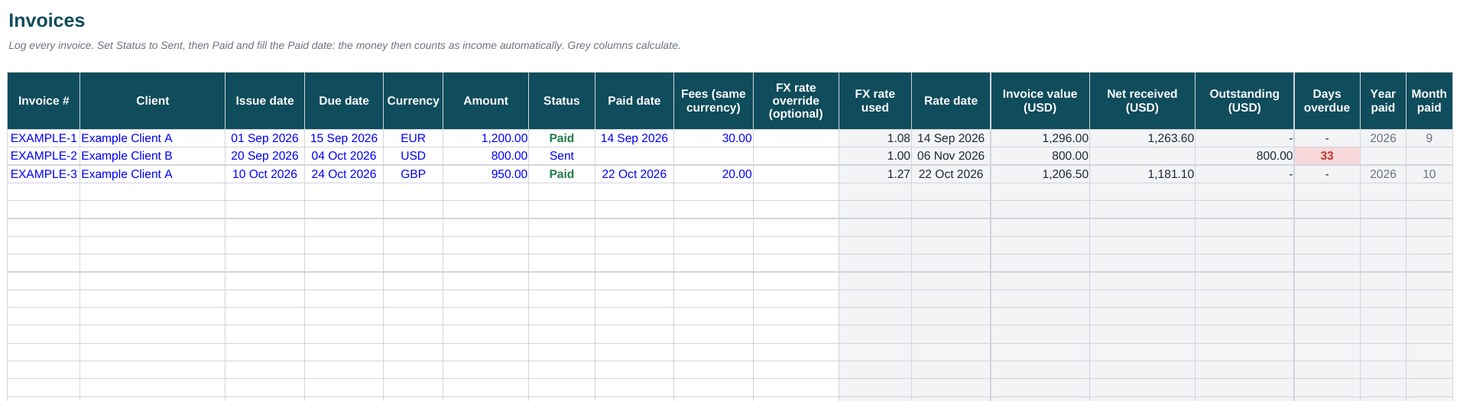
- Invoices: mark an invoice Paid and it becomes income automatically, converted at the rate for that payment date.
- Other income: for money that arrives without an invoice, such as direct transfers and payouts.
- Expenses: log costs with a category and a tax-deductible flag, and record your own pay separately.
- Printable invoice: fill in the lines and print or save it as a PDF.
- Tax: a quarterly set-aside based on a rate you choose, with a reserve balance.
- Settings and Rates: your base currency, clients, categories and a rate cache that keeps the sheet fast.
- Start Here: a 10-minute setup guide inside the file.
- Sample data included so you can see it working before you add your own.
How it works
Set it up once, then spend a couple of minutes a week.
- Set up (10 minutes). Choose your base currency, tax rate and opening cash, then list your clients and categories.
- Log invoices. Enter each invoice. When the client pays, set Status to Paid and add the Paid date and any fees.
- Log expenses and other income. Add costs with a category, and any money that came in without an invoice.
- Read your Dashboard. Profit, tax to set aside, spendable cash and runway update by themselves, and the data checks tell you if something is missing.
Who it is for, and who it is not for
A good fit
- Freelancers and consultants invoicing in foreign currency
- Small studios and agencies of 1 to 5 people
- Online sellers and creators paid through several platforms
- Side-hustlers earning on top of a job
Not a good fit
- Businesses with inventory or employees on payroll
- VAT or sales-tax filing
- Audit-grade accounting. This is a planning tool, not accounting or tax advice.
Get the Freelancer Money Dashboard
- One workbook for Excel and Google Sheets (open it in Google Sheets for live exchange rates)
- Setup guide inside the file
Questions
Do the exchange rates update by themselves?
Yes, once you open the file in Google Sheets (upload it to Google Drive and open with Google Sheets; the Start Here guide shows how). It fetches the daily rate for each payment date. In Excel, or if a rate cannot be fetched, the sheet uses manual rates that you set, and you can type the exact rate your bank gave you on any row.
Do I need to know spreadsheets?
No. You type in the yellow and blue cells and the rest calculates. The file opens with sample data and a 10-minute setup guide.
Does it work on my phone?
You can view it on a phone, but entering data is much easier on a laptop or desktop computer.
Is this tax advice?
No. The tax page sets money aside using a flat rate that you choose. It does not apply any country's tax rules. Check your obligations with a qualified adviser.
What if it is not right for me?
Email us within 14 days of buying and we will refund you, no questions asked.
Will there be updates?
Yes. Buyers get future improvements to this version at no extra cost.